TEMP Zendesk
The goal of this strategy is to maximize distributions of accumulated cash values. We can minimize death benefit costs in the policy to maximize the distributions and the IRR on policy values. Death benefit protection is a part of the strategy, however in this case, it is an ancillary benefit.
Index Universal Life Insurance provides tax advantaged accumulation and the ability to take distribution in the form of ‘Withdrawals’ of basis or ‘Loans’ of accumulation gains that are tax deferred and can be accessed on a tax-free basis.
In this example, we will take distributions at retirement starting at age 66. Premium will be paid for 20 years during the accumulation phase. We will use IUL products to leverage index returns to maximize cash value and distributions. We also want to design the strategy so that the policy survives past life expectancy and is sustainable. With Ensight Intelligent Quote, we can easily compare the most competitive products in the market to achieve the best results for the client.
Case Example
Valued Client
Male
Age 45
Preferred Non-Tobacco
20 Pay
$20K Annual
Solve for Death Benefit
1. To begin, enter your client’s basic information, SAVE and name the case, and then click Go to Product Type to continue.
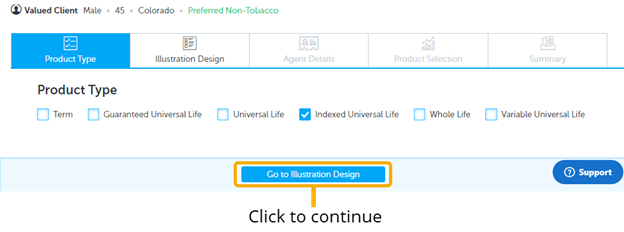
2. Product Type page select only:
3. Solve For Page: Fill in inputs as shown
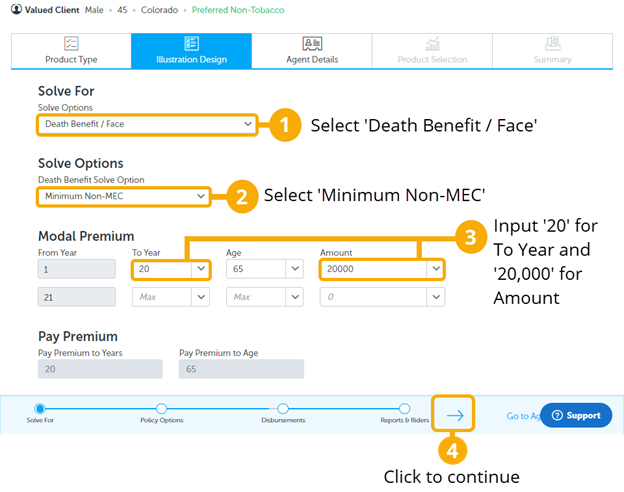
On the Solve For page, solve for Minimum Non-MEC death benefit to minimize the death benefit and maximize the amount of cash value accumulation.
4. Policy Options Page: Fill in inputs as shown:
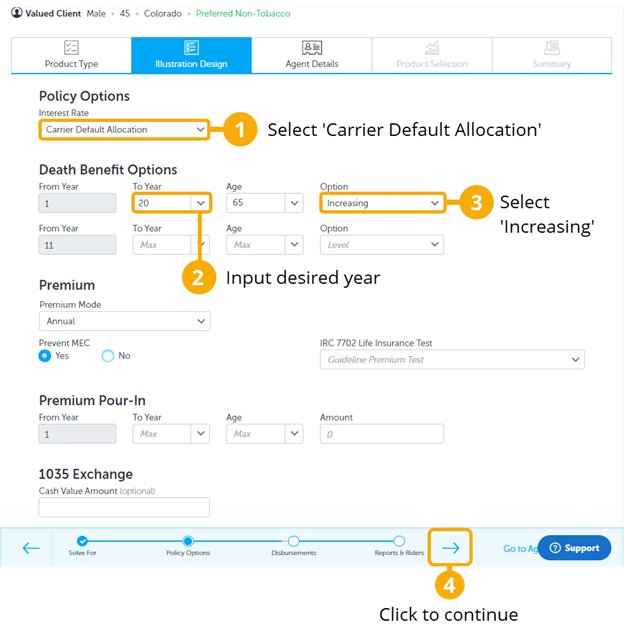
On the Policy Options page, choose the ‘Increasing’ death benefit option during the premium payment period to maintain the Minimum Non-MEC and allow it to maximize cash accumulation. This allows for more cash to be available for supplemental income.
5. Disbursements Page: In this case, we are solving for maximum distributions during the distribution phase - without lapsing the policy. (Eventually you can change the disbursement years to generate different strategies and manipulate the accumulation and distribution time frames).
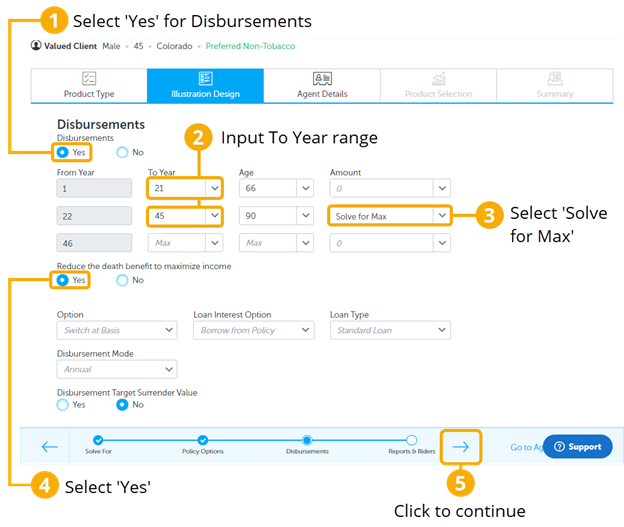
First, decide the age range in which the client will be taking out income from their policy. We chose to take out income at age 66, which is the first year after the client has stopped paying premiums, and then stop at age 90, which is an age just past life expectancy.
6. Reports and Riders Page: Select Yes on ‘Internal Rate of Return’ (IRR) only.
Then click ‘Go to Agent Details’ to continue.
7. Agent Details Page: Enter agent information.
Then click ‘Go to Product Selection’ to continue.
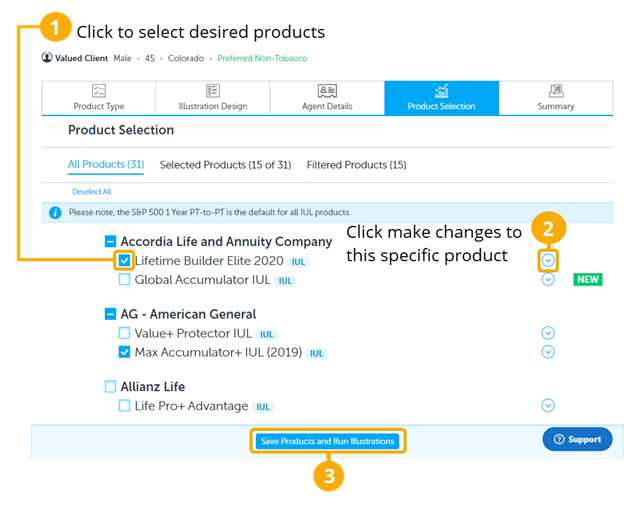
8. Product Selection Page: Select desired products to illustrate and compare.
9. Summary Page: You will now see a scrolling list of products to select from.
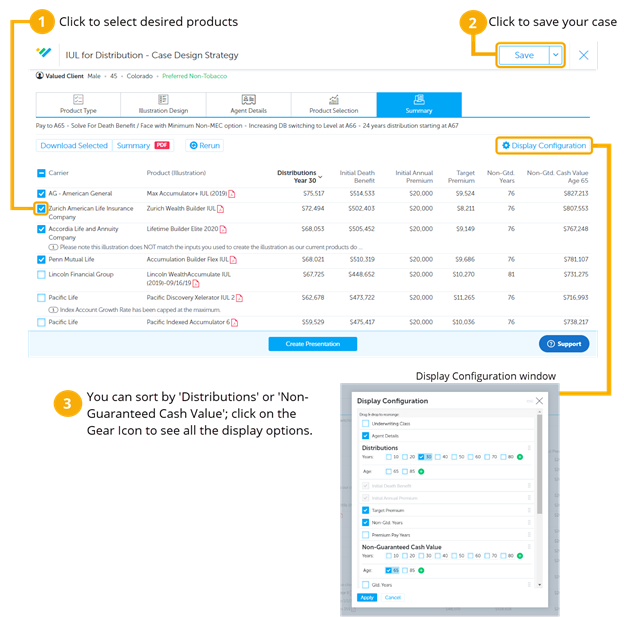
10. Summary Page (Continued):
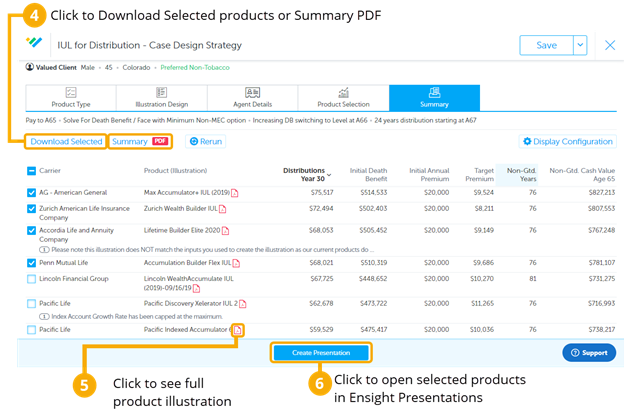
- Click on ‘Distributions’ to sort it high to low. This will help you see the most competitive products.
- This case design can also be saved to your ‘Intelligent Quote Homepage’ by clicking SAVE AS in the top right corner. Make sure to use your naming convention when naming the case.
- When you check the boxes to select products, the ‘Download Selected’ and ‘Summary PDF’ buttons will become highlighted. ‘Download Selected' will download and save the illustrations to your computer. You can download a PDF version with the ‘Summary PDF’ button and print or send it as a benchmark or summary of the competitive products.
- Click on the illustration icon to see the full compliant illustration.
- Select the desired products to and click 'Create Presentation' to open the case in Ensight Presentations, where you can compare and present all the ledger values in the Product Table, Spreadsheet, and Charts.