TEMP Zendesk
The goal of this comparison strategy is to help advisors and clients evaluate options that are presented by running both Whole Life and IUL products and comparing their guaranteed and non-guaranteed values side by side. Ensight Intelligent Quote allows us to run all products and approved carriers to evaluate the best fit for this strategy.
Whole Life products are designed with a guaranteed premium schedule, guaranteed death benefit, and guaranteed cash value accumulation. Whole Life products also have a non-guaranteed ‘dividend’ component that pays dividends to the policy owner based on the strength and performance of the carrier; these dividends may create an enhanced non-guaranteed cash value and offset future premiums.
Index Universal Life provides potential cash value accumulation mirroring a market index. Positive returns may result in higher non-guaranteed cash values and a higher death benefit than Whole Life. However, by contrast the Guarantees of Whole Life may be better suited for more risk-averse clients.
Case Example
Valued Client
Male
Age 45
$25K 20 Pay
Solve for Lifetime Death Benefit
Preferred Non-Tobacco
1. To begin, enter your client’s basic information, SAVE and name the case, and then click Go to Product Type to continue.
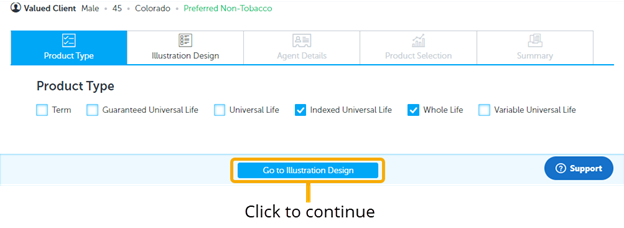
2. Product Type Page: select only
3. Solve For Page: Fill in inputs as shown
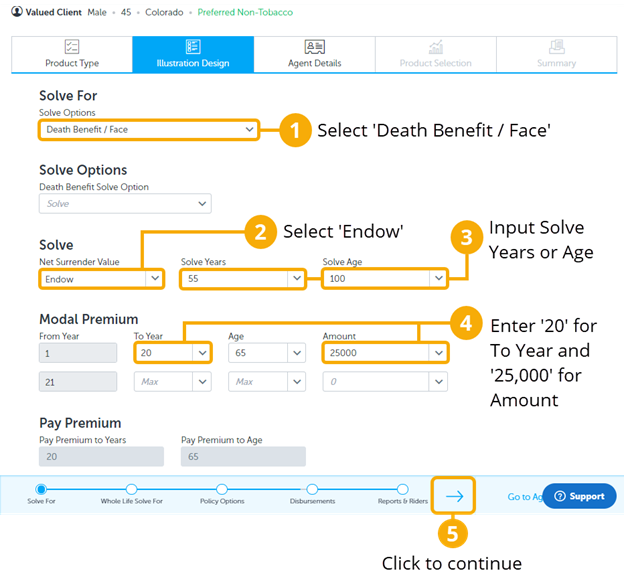
On the Solve For page, choose the death benefit solve to maximize the death benefit and the cash value for the client’s desired level of premium funding. Choosing “Endow” at age 100 allows the products to maximize their cash values, and it best compares Whole Life and IUL products.
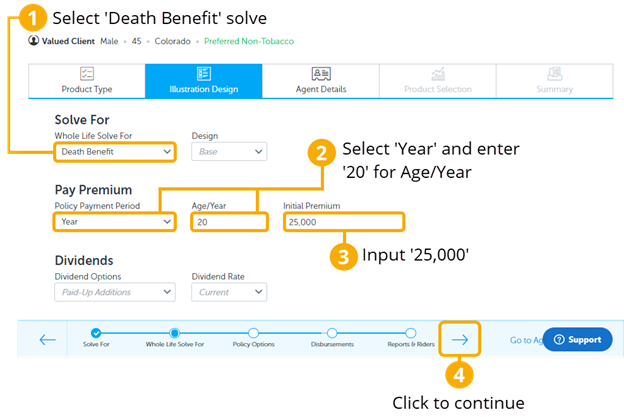
4. Whole Life Solve For Page: Fill in inputs as shown
5. Policy Options Page: Use the default inputs as shown
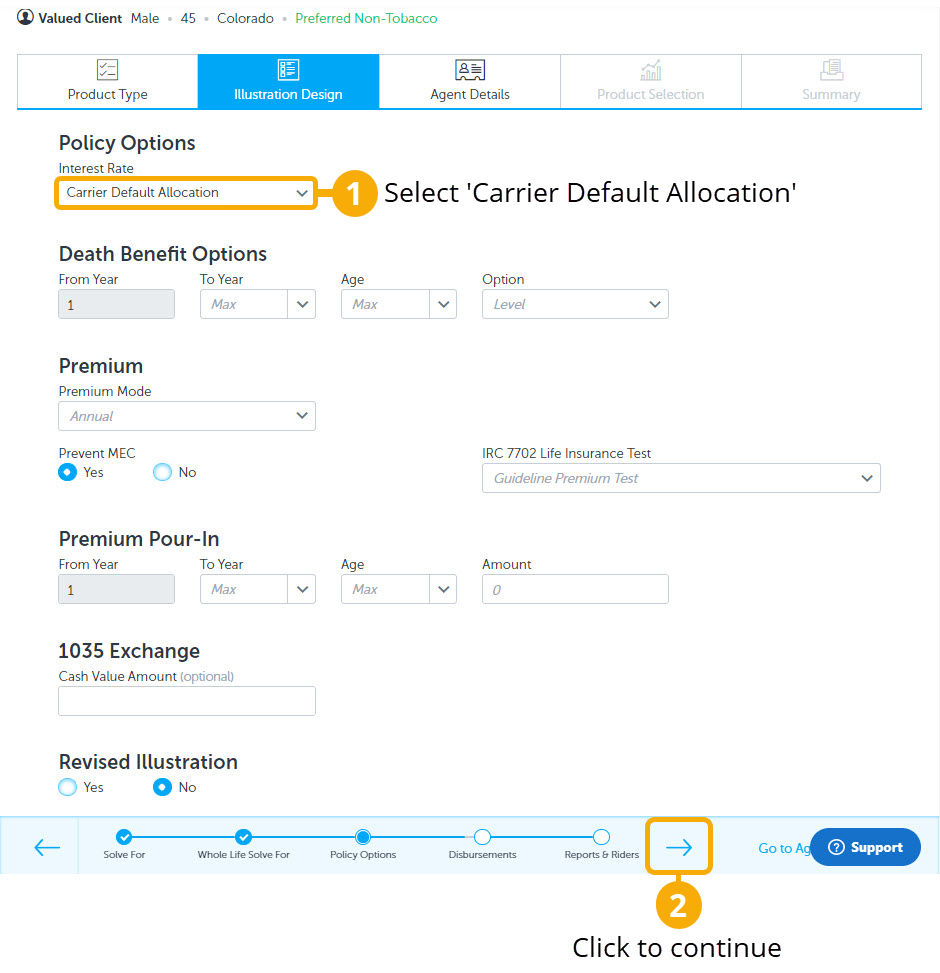
6. Disbursements Page: Select No
Then click the progress arrow to go to the next page.
7. Reports and Riders Page: Select Yes on ‘Internal Rate of Return’ (IRR) only.
Then click ‘Go to Agent Details’ to continue.
8. Agent Details Page: Enter agent information.
Then click ‘Go to Product Selection’ to continue.
9. Product Selection Page: Click on desired products to illustrate and compare. You will see all the approved products including WL and IUL.
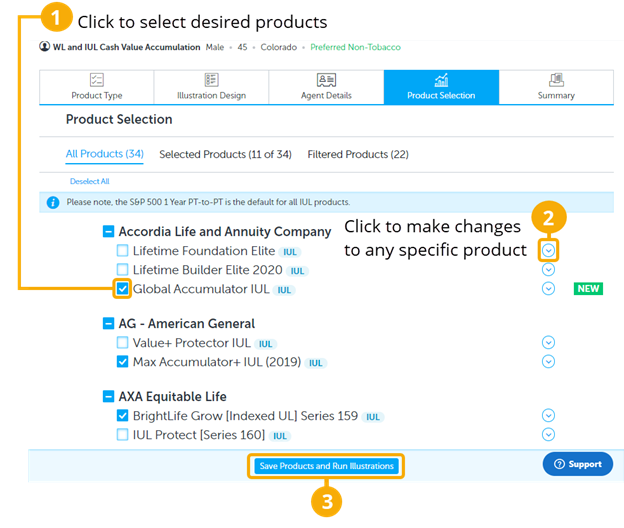
When selecting Whole Life products, pick products that match the strategy’s solve parameters, in this case, a 20 pay. For selecting IUL products, chose a mix of accumulation and protection-based products to see a wider variety.
10. Summary Page: You will now see a scrolling list of products to select from.
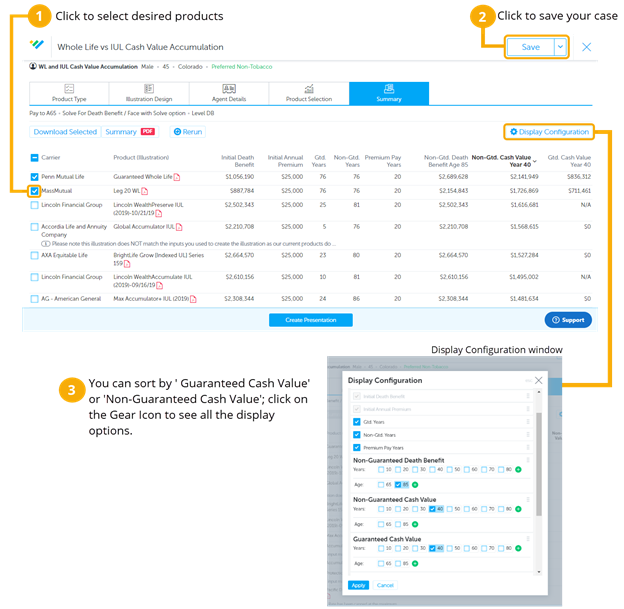
11. Summary Page (Continued):
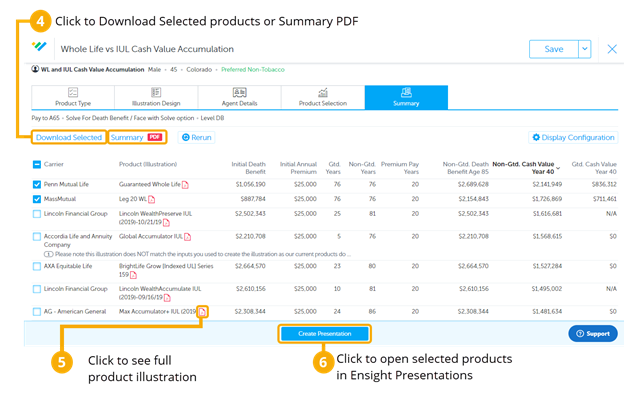
- Click on the ’Non-Guaranteed Cash Value’ column to sort high to low. This will help you see the most competitive products. Since we chose WL and IUL to compare, the IUL products show a higher 'Initial Death Benefit,' while the Whole Life products show higher 'Guaranteed Cash Values.'
- This case design can be saved to your ‘Intelligent Quote Homepage’ by clicking SAVE AS in the top right corner. Make sure to use your naming convention when naming the case.
- When you check the boxes to select products, the ‘Download Selected’ and ‘Summary PDF’ buttons will become highlighted. ‘Download Selected' will download and save the illustrations to your computer. You can download a PDF version with the ‘Summary PDF’ button and print or send it as a benchmark or summary of the competitive products.
- Click on the illustration icon to see the full compliant illustration.
- Select the desired products to and click ‘Create Presentation’ to open the case in Ensight Presentations, where you can compare and present all the ledger values in the Product Table, Spreadsheet, and Charts.