TEMP Zendesk
The goal of this comparison strategy is to position primary and secondary guarantees of Index Universal Life products against low cost GUL products. Guarantees are a desirable element of protection products and give clients the peace of mind that the protection will be there when they need it. However, as costs of guarantees rise, and new products emerge, there are new solutions that provide flexible guarantees and cash value options for the client. Index UL products that provide guarantees to life expectancy and beyond, as well as cash accumulation, can be compared to GUL’s that typically have little to no cash value. Cash value provides options, such as future 1035x into new products, withdrawals, loans (if needed), or cash to pay future premiums.
Case Example
Valued Client
Male
Age 45
Preferred Non-Tobacco
Pay to Age 105
Solve for Premium
$2MM Death Benefit
1. To begin, enter your client’s basic information, SAVE and name the case, and then click Go to Product Type to continue.
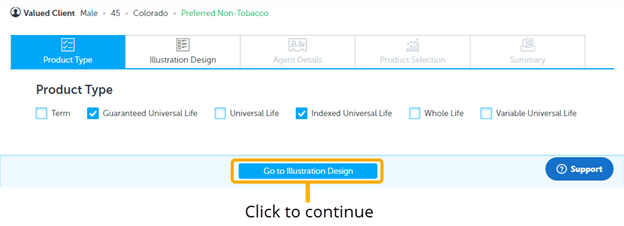
2. Product Type Page select only:
3. Solve For Page: Fill inputs as shown
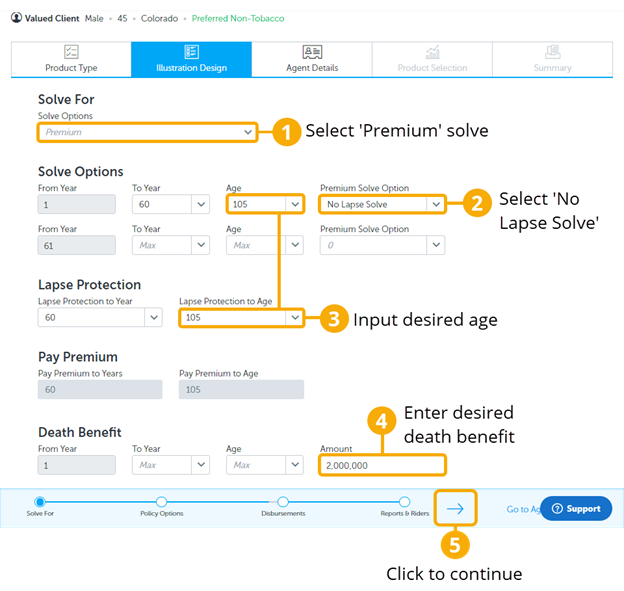
In this strategy, solve for the 'Premium' and have the client make premium payments for 60 years to age 105.
4. Policy Options Page: Use the default inputs as shown:
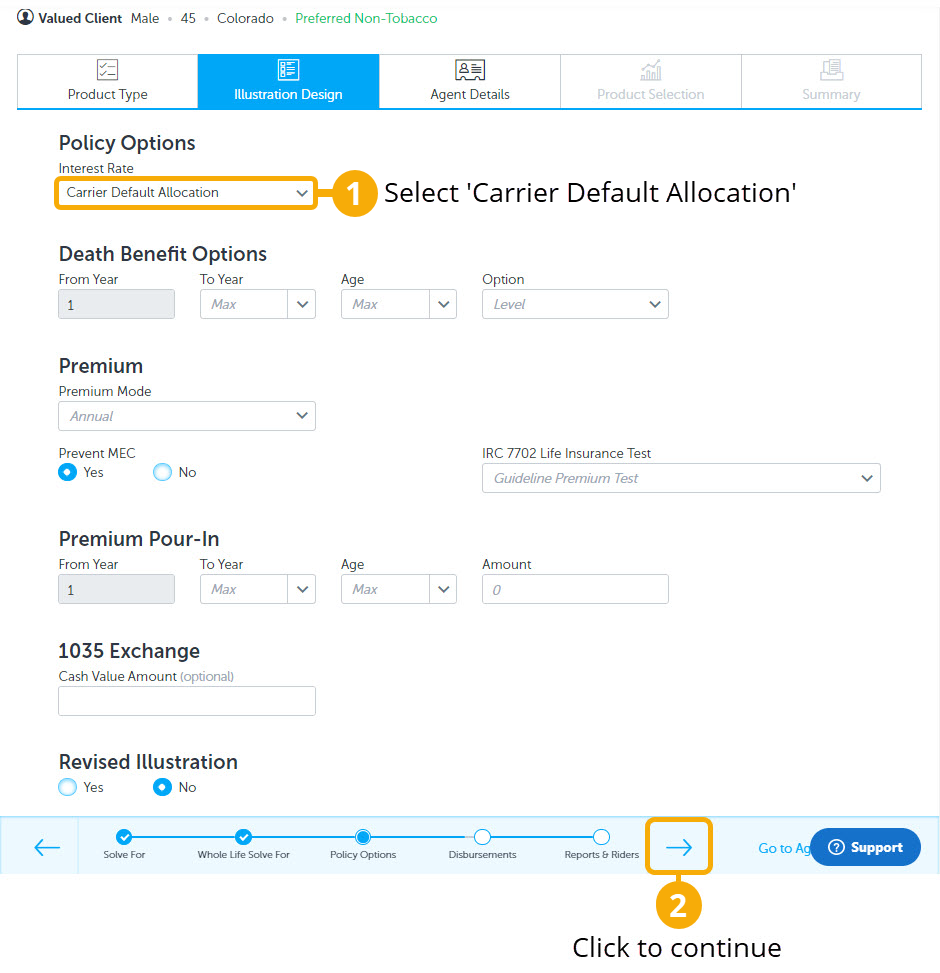
5. Disbursements Page: Select ‘No’
Then click the progress arrow to go to the next page.
6. Reports and Riders Page: Select ’Yes’ on ‘Internal Rate of Return’ (IRR) only.
Then click ‘Go to Agent Details’ to continue.
7. Agent Details Page: Enter agent information.
Then click ‘Go to Product Selection’ to continue.
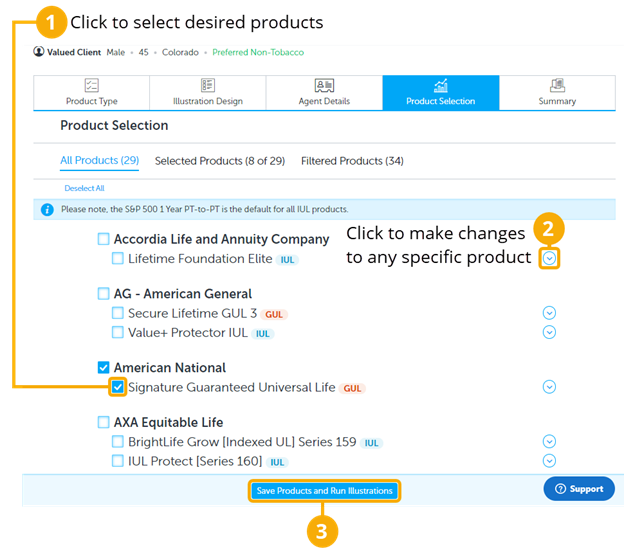
8. Product Selection Page: Click on desired products to illustrate and compare; select products with full or limited guarantees that will reflect the guarantee to the specified age 105. This will require knowing which products have what guarantee features. However on the Summary page, you can also review any product by clicking the PDF Icon to see the product details.
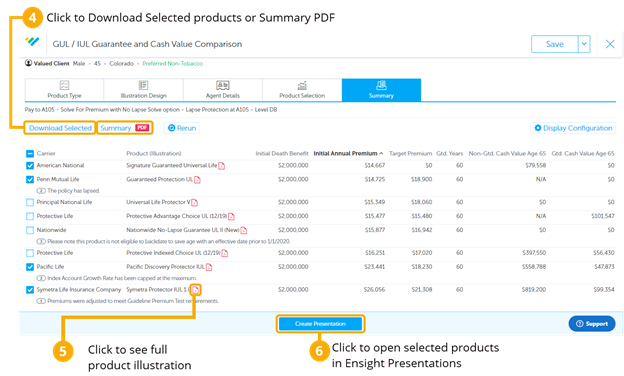
9. Summary Page: You will now see a scrolling list of products to select from.
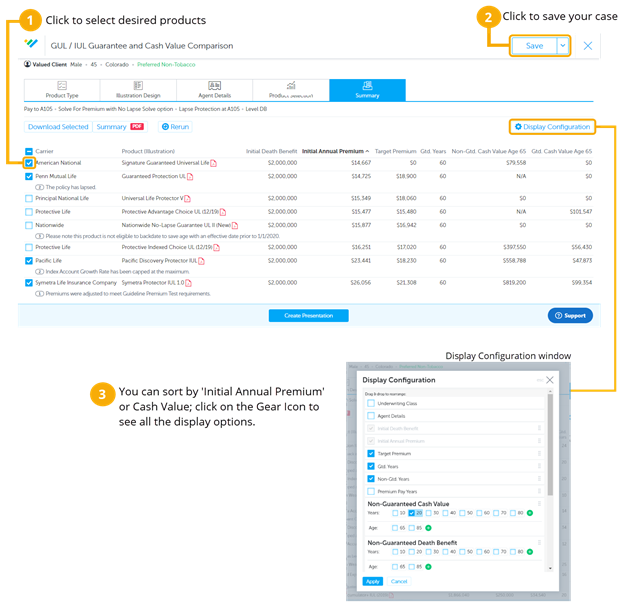
In the Display Configuration, we chose ‘Gtd. Years’ (Guaranteed Years), Non-Guaranteed Cash Value, and Guaranteed Cash Value. This will help compare the cash values between IUL and GUL products, as well as help us see if the products we selected are guaranteed to age 105.
10. Summary Page (Continued):
- This case design can also be saved to your ‘Intelligent Quote Homepage’ by clicking SAVE AS in the top right corner. Make sure to use your naming convention when naming the case.
- When you check the boxes to select products, the ‘Download Selected’ and ‘Summary PDF’ buttons will become highlighted. ‘Download Selected' will download and save the illustrations to your computer. You can download a PDF version with the ‘Summary PDF’ button and print or send it as a benchmark or summary of the competitive products.
- Click on the illustration icon to see the full compliant illustration.
- Select the desired products to and click ‘Create Presentation’ to open the case in Ensight Presentations, where you can compare and present all the ledger values in the Product Table, Spreadsheet, and Charts.